Soviet hardware with a modern heart
Formator grew out of an emulation of the Formanta P432, which was started by Anton Vlasov. The eight waves and thirty-two factory programs from its ROM are carried over bit for bit, and the sound generation follows the original design: 20-bit phase accumulators, a frequency ROM, 11-bit samples and a resonant filter shared by all voices.
Around that core sits a complete modern synthesizer: two wavetable oscillators with a PPG-style sweep through the wave palette, an analog oscillator with Juno-60 features, a sub oscillator and noise, six filter types, three envelopes, two LFOs, voice modes from Poly to an eight-voice Unison, plus chorus, delay and reverb.
It runs as a VST3 and VST2 plug-in and as a standalone application on Windows (32 and 64 bit), and as VST3 and standalone on Linux.
A sound you recognise from the first note
Formator sounds thick and wide on a single voice, and in Dual, Quad and Unison modes it becomes a wall of sound: wide stereo stacks, a Juno-60 style chorus and reverb make pads and brass huge and basses punchy and fat. The digital grain of the ROM keeps its character and stops it from disappearing in the mix.
- EDM
- Euro-Disco
- Italo-Disco
- SpaceSynth
- Hi-NRG
- SynthPop
Fat and dense
Two wavetable oscillators, an analog oscillator with sub, and stacks of up to eight voices with detune and stereo spread.
Alive and moving
The wavetable position follows envelopes and LFOs, vibrato fades in after a delay, and the analog oscillator drifts like real hardware.
Digital character
Three engines — from a faithful copy of the Formanta to a clean modern sound — and a PPG wave mode with its metallic edge.
What Formator is made of
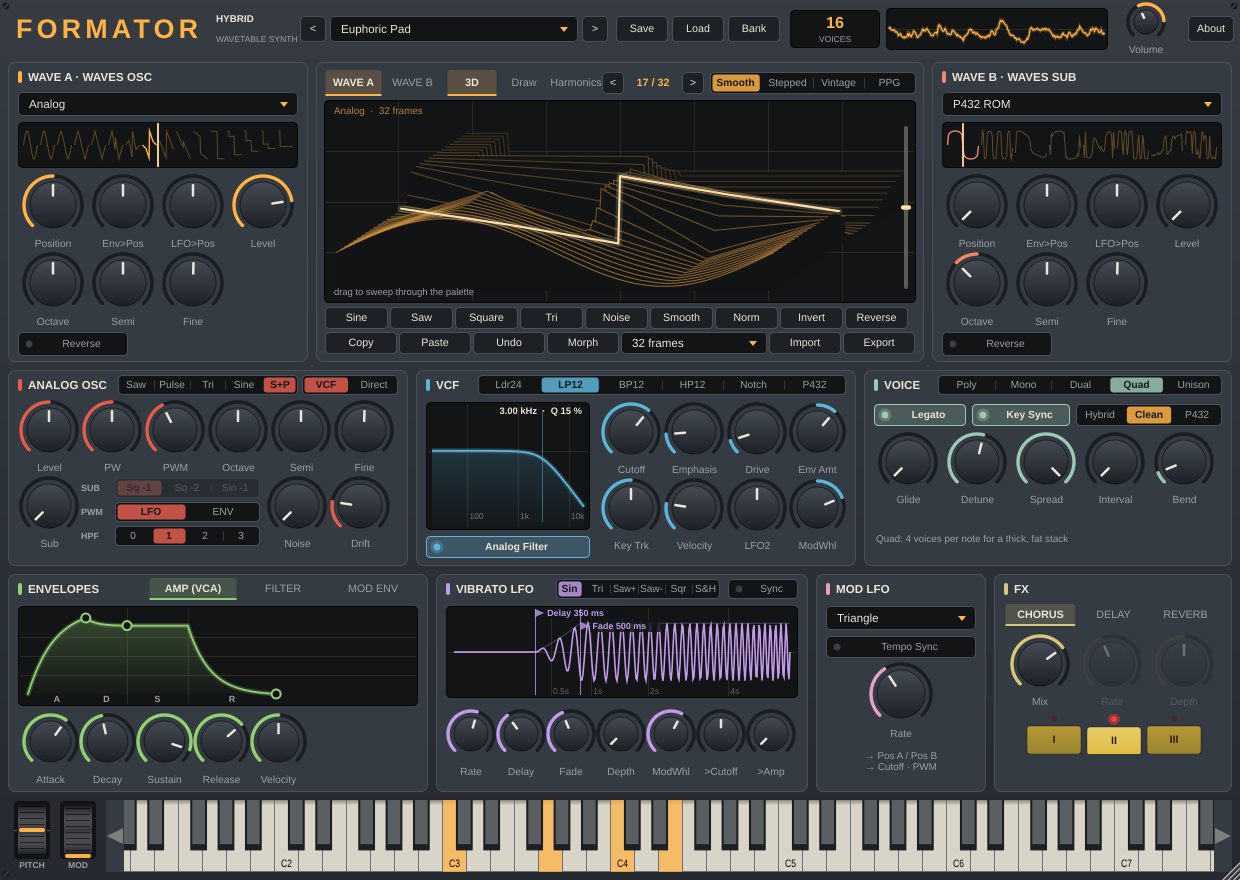
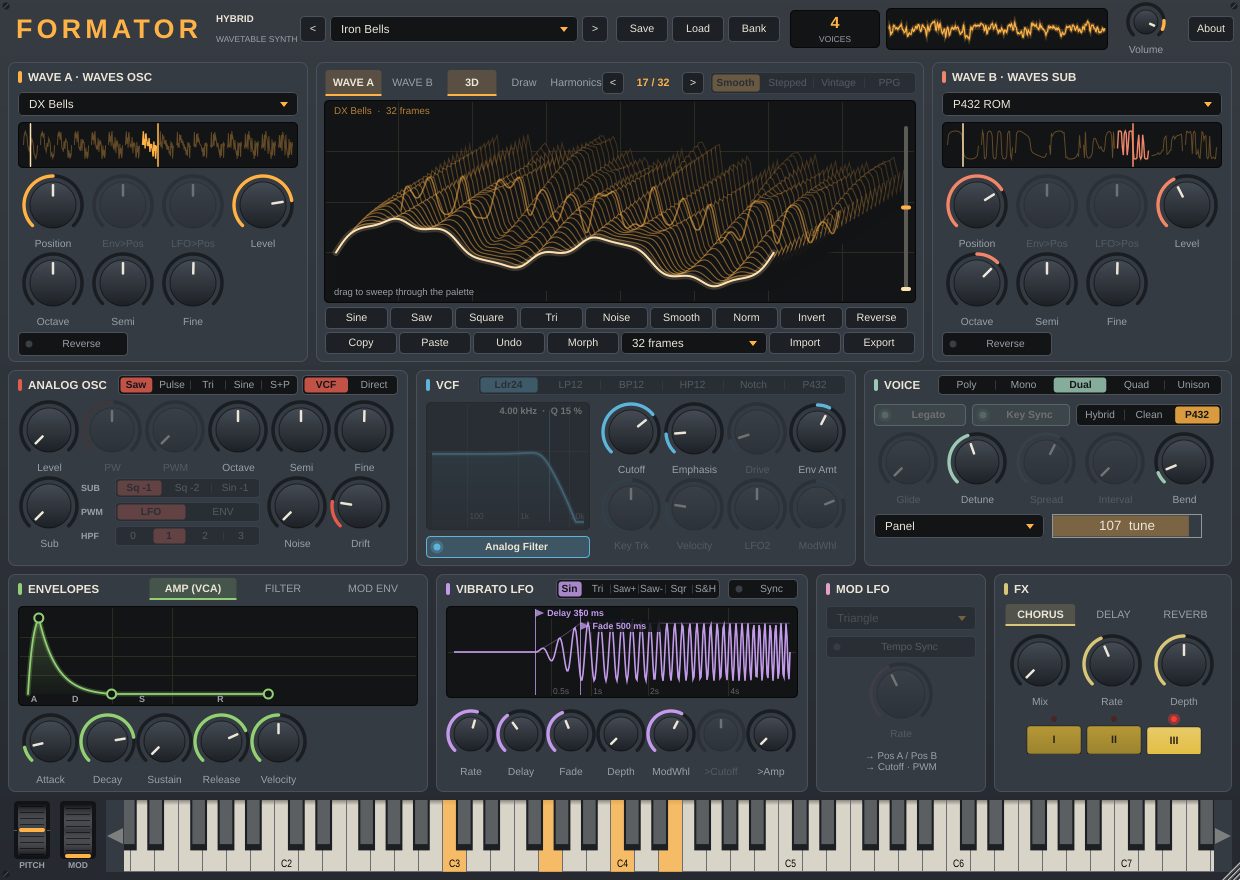
The signal flows from left to right: the oscillators are mixed, pass the filter and amplifier, then the effects. The modulators below control everything along the way.
- Wave A and Wave Btwo wavetable oscillators
-
Each oscillator plays a wavetable: a set of frames arranged from soft to bright. The Position knob sweeps through that palette, just like Waves Osc and Waves Sub on a PPG; the strip of thumbnails under the table selector shows the whole palette and lets you drag the position with the mouse.
- 49 wavetables: the original P432 ROM waves, Analog, PWM, Additive, Vox, Sync, Organ, FM Bell, Fold, Steps, 80s tables (Reso Saw, Brass, DX Piano, DX Bells, Hollow, Strings, FM Bass), 30 tables in the style of the PPG Wave 2.3, and your own User table.
- Env>Pos and LFO>Pos move the position with the MOD ENV envelope and the Mod LFO, so the timbre lives inside every note.
- Level, Octave, Semi, Fine and the Reverse (sweep the table the other way), Flip (mirror the wave horizontally) and Invert (mirror it vertically) buttons — all shown on the displays.
- Read modes: Smooth (smooth morphing), Stepped (in steps), Vintage (512 points, 11 bit) and PPG (128 points, 8 bit, with a metallic edge).
- Wave B sits an octave lower by default — the "sub" of the second oscillator.
- Wave editorthe central display
-
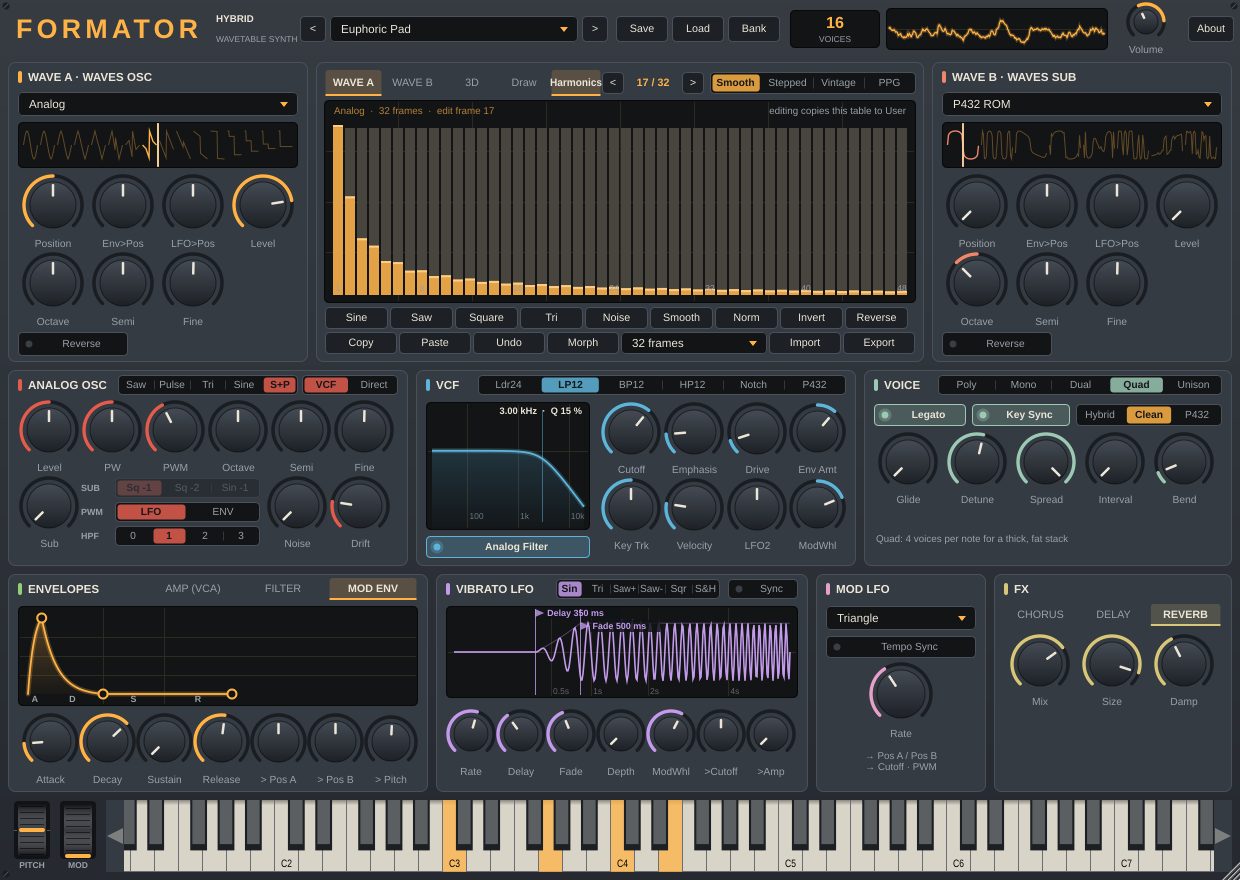
3D shows the whole table in depth and the position that is playing; Draw lets you draw a frame with the mouse; Harmonics edits 48 harmonics. Tools: Sine, Saw, Square, Tri, Noise, Smooth, Norm, Invert, Reverse, Copy/Paste, Undo, Morph (fills the frames in between with a blend from the first to the last), frame count, and WAV import and export (a single cycle or a table with 2048 samples per frame). Editing a factory table copies it to User, so the factory waves stay untouched.
- Analog Oscanalog oscillator, sub, noise
-
The third oscillator is an "analog" one, with BLEP smoothing and a slow pitch drift (Drift). Waveforms: Saw, Pulse, Tri, Sine and S+P — saw and pulse at the same time, as on the Juno-60.
- PW sets the pulse width, PWM the depth of its modulation from the Mod LFO or the FILTER envelope (LFO / ENV switch). They work for Pulse and S+P.
- Sub — a square one or two octaves down or a sine one octave down; Noise — noise.
- HPF 0–3 — the Juno high-pass filter before the VCF: 0 boosts the bass, 1 is off, 2 and 3 cut the lows.
- VCF / Direct — send the analog oscillator through the filter or around it.
- VCFfilter
-
Six types: a 24 dB/oct ladder (Ldr24), LP12, BP12, HP12, Notch and P432 — the original filter. Cutoff and Emphasis (resonance), Drive, Env Amt, Key Trk, Velocity, LFO2 and ModWhl. Drag cutoff and resonance directly on the response graph. The Analog Filter switch adds soft saturation and voice-to-voice component spread; without it the filter is purely digital and sharp.
- EnvelopesAMP, FILTER, MOD ENV
-
Three ADSRs with draggable nodes. AMP shapes the volume and velocity response, FILTER moves the filter, MOD ENV drives the wavetable positions and the pitch (> Pitch: risers, lasers, zaps).
- LFOsVibrato LFO and Mod LFO
-
Vibrato LFO starts after a Delay following the key press and fades in over Fade, like a real player; its rate is set in hertz or in note values, its depth goes up to two octaves, and it also responds to the mod wheel and offers >Cutoff and >Amp. Mod LFO is global, moves the wave positions, the cutoff and PWM, and can follow the host tempo.
- Voicevoices and engine
-
Modes Poly (16 voices), Mono, Dual and Quad (2 and 4 voices per note) and Unison (8 stacked voices). Detune, Spread and Interval shape the stack, Glide and Legato control portamento, Bend sets the pitch wheel range. The Hybrid / Clean / P432 engine switch lives here too.
- FX and controlseffects, wheels, keyboard
-
Chorus with three yellow buttons: I and II are the Juno-60 chorus, III is a free chorus with Rate and Depth; Mix sets the level in every mode. A tempo-synced Delay with ping-pong and a Reverb. To the left of the on-screen keyboard are the PITCH (spring-loaded) and MOD wheels; they work together with your MIDI keyboard and can be automated. Controls that have no effect with the current settings are dimmed.
Three engines, three characters
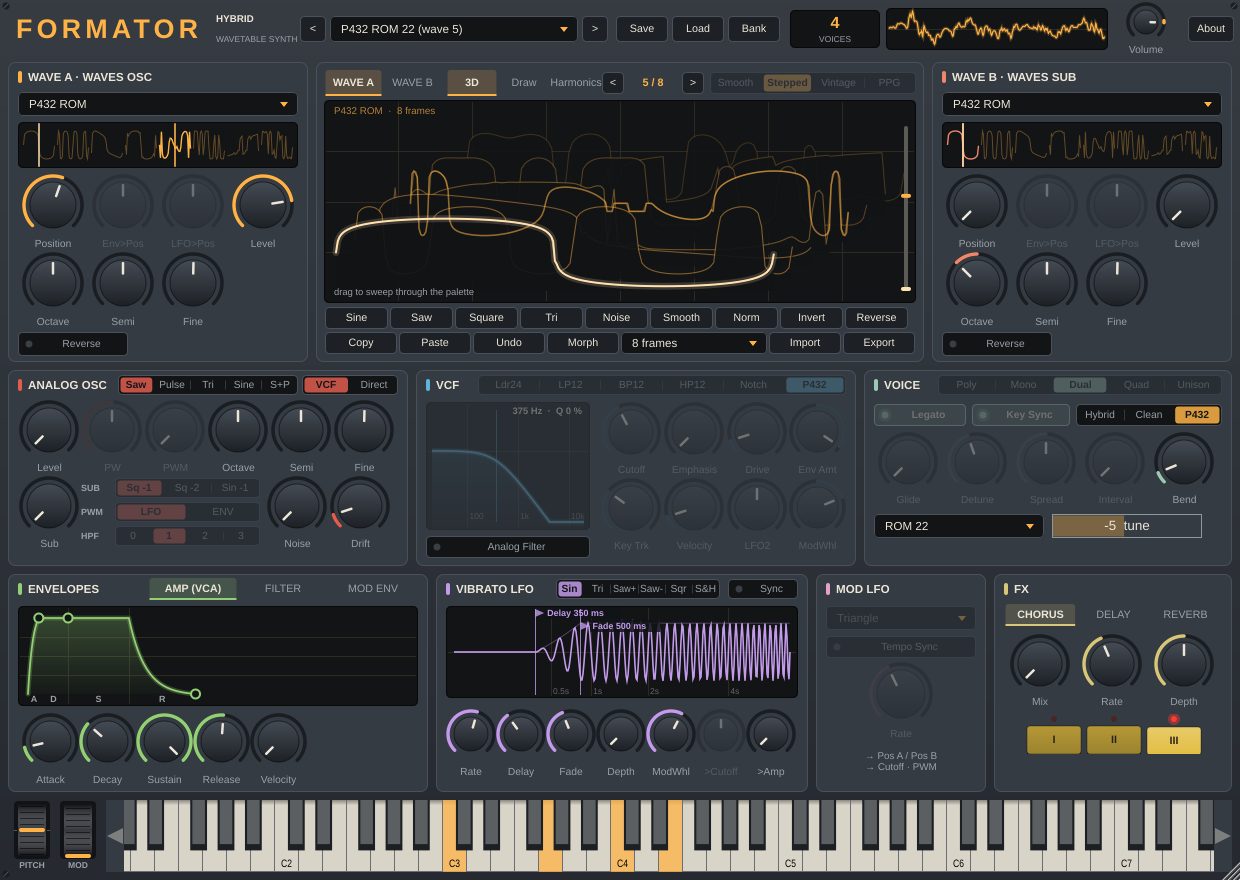
Choose the engine with the switch in the VOICE section. You can switch the same preset between engines and compare.
P432
- 8 voices, free-running 20-bit phases
- one 512-point wave across the whole keyboard, no interpolation
- pitch from the frequency ROM in 1/16-semitone steps
- a shared resonant filter with the FADS envelope
- plus Wave B, the analog oscillator, vibrato and ADSR
Hybrid
- raw 11-bit waves with aliasing
- tuning from the frequency ROM, 8-bit envelopes
- a filter per voice, all LFOs and modulation
- every voice mode
Clean
- band-limited tables without aliasing
- smooth envelopes and exact tuning
- for smooth pads, supersaws and EDM leads
- Vintage and PPG wave modes when you want them
Preset banks
The Formator factory bank always stays the default bank and never changes. Within the Bass, Brass, Pad, Keys & Bells, Pluck, Lead, Arps & FX and P432 ROM categories, presets are sorted alphabetically; pick them from the list in the header, with the arrows next to it or with MIDI Program Change (presets beyond 128 together with Bank Select).
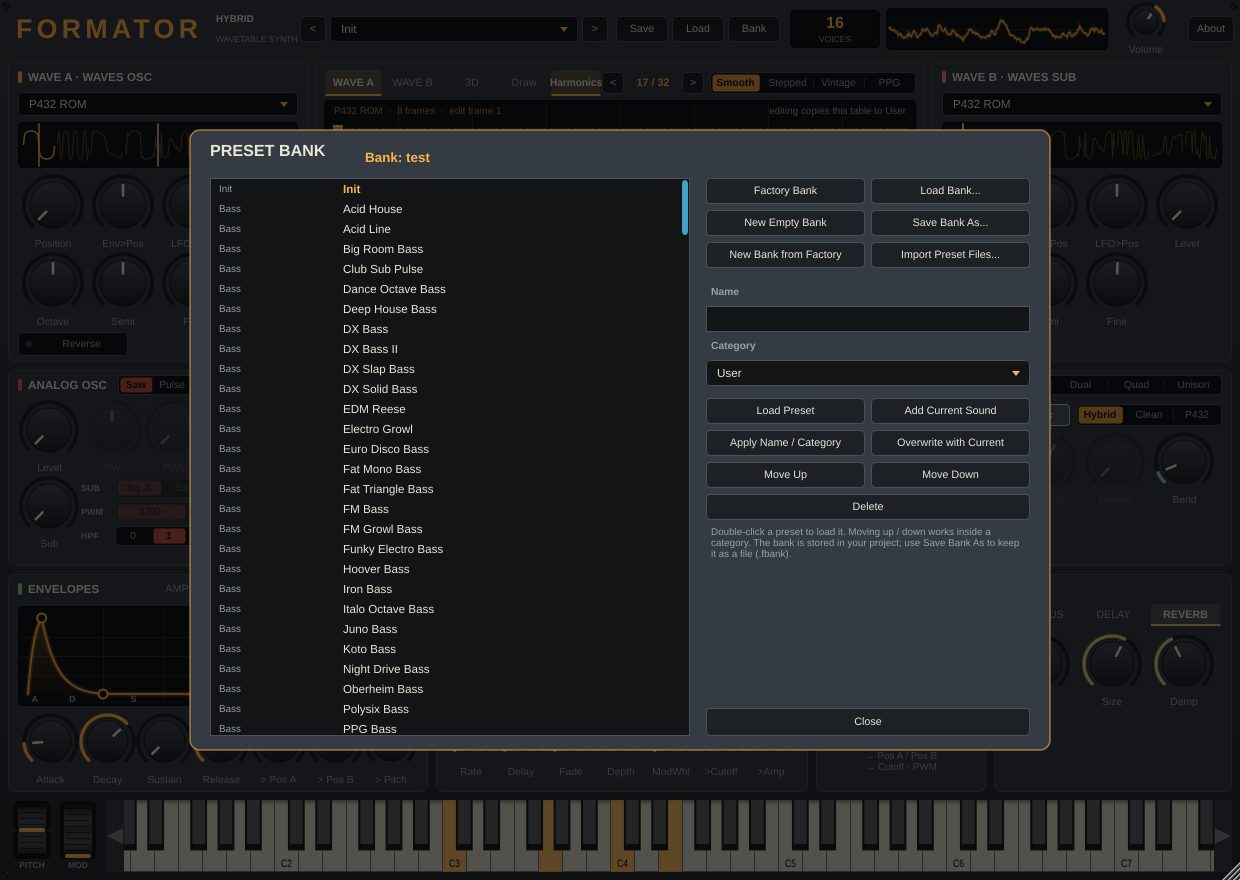
Save a single preset to a .formator file with Save (your user wavetable is stored with it) and open it with Load. For your own collections there are banks — the Bank button opens a separate window.
- Create a bank. New Empty Bank starts an empty one, New Bank from Factory copies all factory presets, Load Bank opens a .fbank file.
- Add a sound. Set up the synth, type a name, pick a category (or type your own) and press Add Current Sound. Import Preset Files adds several preset files at once.
- Keep it tidy. Apply Name / Category renames a preset or moves it to another category, Overwrite with Current replaces it with the current sound, Move Up / Move Down change the order within a category, Delete removes it.
- Save the bank. Save Bank As writes the bank to a .fbank file. The active bank is also stored in your DAW project — open the project and the bank is there. Factory Bank switches back to the factory bank.
What Formator looks like
Download Formator
Choose the build for your system.